IwGameAds and Raw OpenGL Issues

Its been brought to our attention that if you are using raw Open GL functions and IwGameAds together then one system can affect the other.

The problem is that Iw2D is quite naughty in that it does not really save / restore GL states so many of the open GL states could have changed. A few things we noticed in particular are the GL shading model and texture matrix.

To switch back to smooth shading use:

     glShadeModel(GL_SMOOTH);

To repair the texture matrix add the following before you render your GL content:

    glMatrixMode(GL_TEXTURE);
    glPushMatrix();
    glLoadIdentity();

After your GL rendering is finished restore the GL texture matrix:

    glMatrixMode(GL_TEXTURE);
    glPopMatrix();

We will provide an additional GL test bed in our next update

IwGameAds SDK – Free Open Source Cross Platform Ad Engine for Mobile Games and Apps

We’ve received a fair few requests to extract the ad engine from the IwGame engine so that it can be easily used in existing products or products that do not want the fully fledged game engine. So we decided to go ahead and create a new API that supports just the ad engine. Its new home is at http://www.drmop.com/index.php/iwgameads-sdk/ and its now called the IwGameAds SDK. The SDK currently has support for 12 ad providers including:

  • Inner-active
  • AdFonic
  • Vserv – Also provides support for InMobi, BuzzCity, JumpTap, ZestAdz / Komli Mobile and Inner-active
  • Mojiva
  • Millennial Media – Also provides support for AdMob, Amobee, JumpTap and Mojiva
  • AdModa

Features include:

  • Native and cross platform
  • Free and open source
  • Fully documented
  • Support for multiple platforms (iPhone, iPad, iPod, Android, Bada, Playbook, Symbian, WebOS, Windows Mobile, Mobile Linux, LG-TV, Windows and Mac OS)
  • Asynchronously request text, image and html based ads from a variety of ad providers
  • Automatic extraction of ad data, such as image url, click url and text
  • Provision for targeted ads by age, gender, location etc..
  • Integrated ads view that can display animating ads to the user as well as detect clicks and launch the external URL / app that deals with the click destination
  • Cache and display multiple ads from multiple providers
  • Eye catching animating ads system that is currently generating 3%-8% CTR
  • Ad mediation using the priority based IwGameAdsMediator class
  • Very simple to install, set-up and use

We have not removed the ad API from the IwGame engine, this is just an additional SDK for those that want to use the ad API away from the game engine.

POLL – Which Features Next for IwGame?

Please take our poll. Which features would you like to see come to IwGame next?

[poll id=”2″]

You can select up to 4. Oh, if you have additional ideas then please feel free leave them as a comment.

IwGame Engine v0.281 Released – Box2D Fixes

We found a couple of mistakes in the Box2D integration in  IwGame 0.28, so here is the fixed version, changes include:

  • Actor / scene Box2D implementation switched from multi-inheritence to composition
  • Bug Fix – Fixed issue with incorrect actor orientation when placed under Box2D control
  • bug Fix – Values for velocity, angular velocity etc were not being applied in XOML

You shouldn’t need to change any of your game code with this update.

IwGame Engine v0.28 Released – Box2D Physics Integration has Arrived

New here? What’s IwGame? IwGame is an open source free to use cross platform game engine for iPhone, iPad, Android, Bada, Playbook, Symbian, Windows Mobile, LG-TV, Windows and Mac, built on top of the Marmalade SDK. You can find out more and download the SDK from our IwGame Engine page.

IwGame Game Engine Update

The magical elves of Pocketeers Land have been incredibly busy hammering out the latest update to the IwGame game engine and here it is. We’ve had a lot of requests for Box2D integration so we shunted it in there and managed to integrate it into the XOML mark-up language as well.

Here’s the list of changes for IwGame 0.28:

  • Image, resource group and timeline managers have been collapsed into a single resource manager. All calls to scene and global resource managers should go through getResourceManager()
  • All resource types can now be marked as managed
  • New Box2D IwGame classes added
  • Box2D integrated into the scene, actor system as well as XOML. Box2D can be disabled by undefining IW_GAME_BOX2D in IwGameBox2d.h
  • New shape system added IwGameShapes that allows you to define box, circle and polygon shapes, also available in XOML
  • XOML tag names and attrbutes are now case insensitive
  • Scenes XOML now supports Gravity and WorldScale
  • Actor XOML now supports new tags Box2dMaterial, Shape, COM (centre of mass), Sensor and CollisionFlags
  • Timelines can now be shared across different actors and scenes without them playing back too fast and not updating properly
  • CIwGameActor now has a new mthod removeVisual() which removes the actors visual from the scenes visual sprite manager
  • ToLower() and ToLower() methods added to CiwGameXml. These methods will convert all tag name and attribute names to lower or upper case (values are left untouched)

Yes, we did go ahead and remove all of the different types of managers and rolled them into a single resource manager. We also got rid of case sensitivity for tag and attribute names, which should save many of you the pain of tracking down case issues when writing XOML. I for one welcome the change 🙂

I was playing with time lines yesterday and discovered that if I attached the same one to more than one object, it got updated multiple times during a single frame, which causes the animationto play back too fast. A fix has now been added for that, so time lines can now be re-used across multiple actors and scene.

Now on to the meatier changes

Box2D Integration in Detail

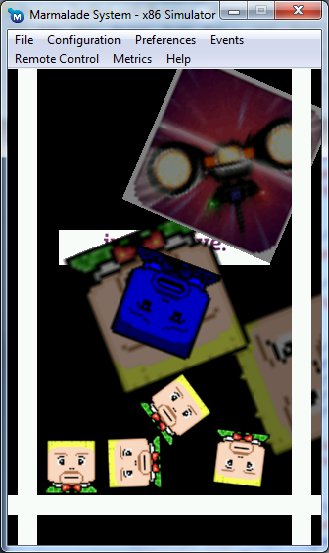
Ok, so Box2D integration requests approached critical mass so we went ahead and integrated Box2D into the engine and the XOML system. The tst bed now shows anew scene (GameScene3) which has a solid floor, 2 walls and a bunch of actors that are dropped into the scenes. As you can see from the tst bed the physics is working pretty well. Lets take a quick look at the Game3Scene in XOML:

<Scene Name="GameScene3" CanvasSize="320, 480" FixAspect="true" LockWidth="false" Colour="255, 255, 255, 255" AllowSuspend="false"> <Box2DMaterial Name="Solid" Type="static" Density="1.0" Friction="1.0" Restitution="0.1" /> <Box2DMaterial Name="BounceyBall" Type="dynamic" Density="1.0" Friction="0.9" Restitution="0.6" /> <Shape Name="PlayerShape" Type="box" width="60" height="60" /> <Shape Name="Wall" Type="box" width="20" height="320" /> <Shape Name="Floor" Type="box" width="320" height="20" /> <Timeline Name="Player1Intro1" AutoPlay="true"> <Animation Anim="PlayerImageAnim" Target="SrcRect" Repeat="0" StartAtTime="1"/> </Timeline> <TestActor Name="Floor" Position="0, 200" Size="320, 20" Angle="0" SrcRect="0, 0, 32, 32" Image="Block" Shape="Floor" Box2dMaterial="Solid" CollisionFlags="1, 1, 1" /> <TestActor Name="LeftWall" Position="-140, 0" Size="20, 480" Angle="0" SrcRect="0, 0, 32, 32" Image="Block" Shape="Wall" Box2dMaterial="Solid" CollisionFlags="1, 1, 1" /> <TestActor Name="RightWall" Position="140, 0" Size="20, 480" Angle="0" SrcRect="0, 0, 32, 32" Image="Block" Shape="Wall" Box2dMaterial="Solid" CollisionFlags="1, 1, 1" /> <TestActor Name="Player1" Position="-50, -200" Size="60, 60" Angle="0" SrcRect="0, 0, 36, 40" Image="Sprites" Timeline="Player1Intro1" Shape="PlayerShape" Box2dMaterial="BounceyBall" CollisionFlags="1, 1, 1" /> <TestActor Name="Player2" Position="0, -150" Size="60, 60" Angle="0" SrcRect="0, 0, 36, 40" Image="Sprites" Timeline="Player1Intro1" Shape="PlayerShape" Box2dMaterial="BounceyBall" CollisionFlags="1, 1, 1" /> <TestActor Name="Player3" Position="50, -200" Size="60, 60" Angle="0" SrcRect="0, 0, 36, 40" Image="Sprites" Timeline="Player1Intro1" Shape="PlayerShape" Box2dMaterial="BounceyBall" CollisionFlags="1, 1, 1" /> <TestActor Name="Player4" Position="0, -1000" Size="60, 60" Angle="0" SrcRect="0, 0, 36, 40" Image="Sprites" Timeline="Player1Intro1" Shape="PlayerShape" Box2dMaterial="BounceyBall" CollisionFlags="1, 1, 1" /> </Scene>

In the above XOML scene we declare two materials, one for our solid environment pieces (floor and walls) and then another for our bouncy players.

Next we define a shape for our player, a shape for our floor and s shape for our walls.

Lastly, we create actors that represent our floor, left wall, right wall and 4 player actors, assigning the correct shapes and materials.

The above creates a scene with animating interactive physics objects

Box2D integration will be expanded in future updates to more features to IwGame and XOML.

If you want to learn more about the internals of the Box2D integration then take a look at the IwGameBox2D source files.

Shapes in XOML

You now create shapes in code or by using XOML mark-up. Take a look at the new shape classes in IwGameShapes.h. Below is an example showing a few shapes defined in XOML:

<Shape Name="PlayerShape" Type="box" width="60" height="60" /> <Shape Name="AlineShapel" Type="circle" radius="20" /> <Shape Name="Platform1" Type="polygon"> <Point Value="-100, -100" /> <Point Value="-100, -200" /> <Point Value="100, -100" /> <Point Value="100, 100" /> <Point Value="-100, 100" /> </Shape>

Shapes can be used to define physical collision boundaries for the integrated physics system. Eventually IwGame’s new path system will utilise shapes (when its implemented)

New Resource System

The new resource system now handles all resources of any type, so all the old separate resource managers have gone. To ensure that developers do not have to be too careful with naming resources, different resources can share the same name. However, this does mean that when you ask for a resource you do need to specify its type. Here’s a few examples:

CIwGameImage* image = (CIwGameImage*)IW_GAME_GLOBAL_RESOURCES->getResourceManager()->findResource(“Sprites”, “Image”);
CIwGameAnim* animation = (CIwGameAnim*)IW_GAME_GLOBAL_RESOURCES->getResourceManager()->findResource(“PlayerImageAnim”, “Animation”);

Note that the 2nd parameter specifies the type of resource, in this case it is an Image and an Animation.

Valid type names are as follows:

  • Game – Game objects
  • Scene – Scene objects
  • Image – Image objects
  • Timeline – Animation timeline objects
  • ResourceGroup – Resource group objects
  • Animation – Animation objects
  • Shape – Shape objects
  • Box2dMaterial – Box2D material objects

This does not include any of your own custom types that you add to the system yourself.

Well, that’s it for this update. We are very likely moving onto creating the editor to accompany the engine as our next task so IwGame engine updates may come a little slower.

IwGame Engine Need Feedback

We know that just over 100 developers have now downloaded IwGame, but we don’t know who is using it and for what, so making the decision to big changes to improve the engine can be a tough choice, for example the recent animation system changes will have meant a fair bit of code re-writing for some.

We have a new big change that we would like to make to allow the engine and XOML in particular to support many more resource types. At the moment we have specific managers that manage separate types of resources such as images, resource groups, animations and time lines. The global resource system and scenes both have these managers. The change we would like to make its to remove all of those managers and have a single unified resource system that encompasses all resources and all resource types. A quick example can better explain this:

If you want to add a marmalade resource gruop to the scene so that it gets managed by the global resource system you would use code like this:

// Create a resource group for our level1 and add it to the resource group manager CIwGameResourceGroup* level1_group = new CIwGameResourceGroup(); level1_group->setGroupName("Level1"); level1_group->setGroupFilename("Level1.group"); level1_group->Load(); IW_GAME_GLOBAL_RESOURCES->getResourceGroupManager()->addGroup(level1_group);

At the moment you need to get the resource group manager and add the resources. The problem being that you have to request the resource group manager. We would like to change this so that you only ever have to request a single manager, so the code would look more like this:

// Create a resource group for our level1 and add it to the resource group manager CIwGameResourceGroup* level1_group = new CIwGameResourceGroup(); level1_group->setGroupName("Level1"); level1_group->setGroupFilename("Level1.group"); level1_group->Load(); IW_GAME_GLOBAL_RESOURCES->getResourceManager()->addResource(level1_group, "ResourceGroup");

You would call the same method no matter what type of resource you add, the only thing that would change would be the resource name type. So for example, if you pass an image you would pass “Image” or an animation you would pass “Animation” etc.

The major advantage of this system is that we and yourself included can add custom resource types to the scene and global resource managers, which means you can also include them inside XOML files.

If you strongly object to this change then please let us know quickly before we make a final decision.

IwGame Engine v0.27 Released – Powerful Animation and XOML Support

New here? What’s IwGame? IwGame is an open source free to use cross platform game engine for iPhone, iPad, Android, Bada, Playbook, Symbian, Windows Mobile, LG-TV, Windows and Mac, built on top of the Marmalade SDK. You can find out more and download the SDK from our IwGame Engine page.

After much bashing with hammers and sawing with saws IwGame version 0.27 is now available for download, including updated documentation. Some of you may get a little upset as we have completely replaced the old animation system with a brand new more powerful system. Sorry for that, but thought better to change it sooner rather than later.

Lets take a quick look at the changed for v0.27:

  • Added new customisable mark-up language XOML that allows you to declare most IwGame obects declaratively, including scenes, custom actors, images, resource groups, animations, animation timelines
  • CIwGameAnimManager has been removed and replaced with the much more powerful CIwGameAnimTimeline, paving the way for very powerful actor and scene animations
  • Animation system has been completely changed to use a proper key frame interpolation system
  • Support for animation targets to automate update of object properties
  • CIwGameActorImage initialisation no longer requires a scene or an animtion. CIwGameActorImage initial image source rectangle now matches the initial size of the actor
  • setCollisionSize() added to CIwGameActor to allow setting of collision size from a radius
  • CIwGameDataInput and CIwGameDataOutput stream classes added
  • Simple, fast pooled memory XML parser added (CIwGameXml)
  • CIwGameResourceGroup system added to encapsulate Marmalade resource groups
  • Global and scene local resoure systems added
  • CIwGameImage can now be instantiated 3 ways, from memory buffer, from file or from web file
  • CiwGameImage initialisation from memory buffer no longer requires specification of the is_jpeg flag
  • Blocking parameter can now be passed to CIwGameImage::Load()
  • CIwGameScene scenes can now be assigned a colour. All contained actors will be scaled by the colour, allowing flash and fade effects
  • CIwGameBitmapSprite::setSrcRect() now takes a CIwRect
  • FRAME_SPEED_LOCK_MS now added to set frame rate cap
  • CIwGame::Init() changed to CIwGame::Init(bool enable_http), passing true will boot up the HTTP manager and allow you to use it in-game
  • Bug Fix – CIwGameHttp crashed if a request came back after the object was shut down
  • Bug fix – CIwGameActor::setCollisionRect() bug fixed
  • Bug fix – All actors were being treated as though they were collidable
  • Bug fix – Sprites no lnoger try to render themselves if their associated image is not yet loaded

Yes, I know that’s a lot of changes! Lets take a look at some of these new changes in more depth

What’s this new XOML Mark-up Language stuff all about?

Ok, time for the old copy and past. After working two days flat on updating documentation I feel less obliged to write fresh content 🙂

I like to make code that is extensible but I also like to make life easier for myself without sacrificing too much versatility, so my coding style constantly strives towards balancing ease of use and extensibility. I’ve done a lot of Silverlight / WPF coding in the past which is where I came across Microsoft’s XAML mark-up language. I later came across Adobe Flex’s MXML mark-up language and decided that mark-up language was the way to go with game and app development. Being able to define my whole UI, game scenes, animations and even game logic using simple readable XML seemed like the best way to go.

IwGame adds some of the great functionality found in XAML / MXML allowing you to declare much of what will appear in your game using XOML (XML Object Modelling Language).

The major advantages of using XOL include:

  • Saves a whole bunch of typing
  • Design and layout scenes and actors using mark-up
  • Design resource groups and images using mark-up
  • Design complex animations and time line animations
  • No recompiling required to test changes
  • Add new content without resubmitting to the app stores
  • Add content that is streamed from a server

As you can see, we have some pretty neat advantages to switching over to using a mark-up language

Lets take a quick look at an example XOML file:

<?xml version="1.0"?> <xml> <ResourceGroup Name="Audio" GroupFile="Audio.group" Preload="true" /> <ResourceGroup Name="Level1" GroupFile="Level1.group" Preload="true" /> <Image Name="Sprites" Location="Level1" Preload="true" /> <Image Name="Buddy" Location="http://www.battleballz.com/bb_icon.gif" Preload="true" Blocking="false" /> <Animation Name="PlayerImageAnim" Type="rect" Duration="0.8" > <Frame Value="0, 0, 36, 40" Time="0.0" /> <Frame Value="0, 40, 36, 40" Time="0.1" /> <Frame Value="0, 80, 36, 40" Time="0.2" /> <Frame Value="0, 120, 36, 40" Time="0.3" /> <Frame Value="0, 160, 36, 40" Time="0.4" /> <Frame Value="0, 200, 36, 40" Time="0.5" /> <Frame Value="0, 240, 36, 40" Time="0.6" /> <Frame Value="0, 280, 36, 40" Time="0.7" /> </Animation> <Animation Name="SpinAnim1" Type="float" Duration="8" > <Frame Value="0" Time="0.0" /> <Frame Value="90" Time="2.0" /> <Frame Value="180" Time="4.0" /> <Frame Value="270" Time="6.0" /> <Frame Value="360" Time="8.0" /> </Animation> <Animation Name="ScaleAnim1" Type="float" Duration="4" > <Frame Value="0.1" Time="0.0" /> <Frame Value="1.0" Time="1.0" /> <Frame Value="1.5" Time="2.0" /> <Frame Value="1.6" Time="3.0" /> <Frame Value="1.65" Time="4.0" /> </Animation> <Animation Name="ColourAnim1" Type="vec4" Duration="4" > <Frame Value="255, 255, 255, 0" Time="0.0" /> <Frame Value="255, 255, 255, 200" Time="1.0" /> <Frame Value="255, 255, 255, 255" Time="2.0" /> <Frame Value="255, 255, 255, 200" Time="3.0" /> <Frame Value="255, 255, 255, 0" Time="4.0" /> </Animation> <Animation Name="PlayerStates" Type="string"> <Frame Value="State1" Time="0" /> <Frame Value="State2" Time="0.5" /> <Frame Value="State3" Time="1.0" /> <Frame Value="State4" Time="1.5" /> </Animation> <Timeline Name="Scene1Anim" AutoPlay="true"> <Animation Anim="SpinAnim1" Target="Angle" Repeat="1" StartAtTime="0"/> <Animation Anim="ScaleAnim1" Target="Scale" Repeat="1" StartAtTime="0"/> </Timeline> <Scene Name="GameScene" CanvasSize="320, 480" FixAspect="true" LockWidth="false" Current="true" Colour="128, 128, 128, 255" Timeline="Scene1Anim"> <Timeline Name="Player1Intro" AutoPlay="true"> <Animation Anim="PlayerImageAnim" Target="SrcRect" Repeat="0" StartAtTime="0"/> <Animation Anim="SpinAnim1" Target="Angle" Repeat="4" StartAtTime="10"/> <Animation Anim="ColourAnim1" Target="Colour" Repeat="10" StartAtTime="2"/> </Timeline> <TestActor Name="Player1" Position="-100, 0" Size="100, 100" Angle="45" SrcRect="0, 0, 36, 40" Image="Sprites" Timeline="Player1Intro" /> <TestActor Name="Player2" Position="0, 0" Size="100, 100" Angle="-45" SrcRect="0, 0, 36, 40" Image="Sprites" /> <TestActor Name="Player3" Position="0, 100" Size="100, 100" Angle="0" SrcRect="0, 0, 64, 64" Image="Buddy" /> </Scene> <Scene Name="GameScene2" CanvasSize="320, 480" FixAspect="true" LockWidth="false" Colour="0, 0, 255, 255" AllowSuspend="false"> <Timeline Name="Player1Intro2" AutoPlay="true"> <Animation Anim="PlayerImageAnim" Target="SrcRect" Repeat="0" StartAtTime="1"/> <Animation Anim="SpinAnim1" Target="Angle" Repeat="4" StartAtTime="10"/> </Timeline> <TestActor Name="Player1" Position="0, 0" Size="100, 100" Angle="45" SrcRect="0, 0, 36, 40" Image="Sprites" Timeline="Player1Intro2" /> <TestActor Name="Player2" Position="100, 0" Size="100, 100" Angle="-45" SrcRect="0, 0, 36, 40" Image="Sprites" /> <TestActor Name="Player3" Position="100, 100" Size="100, 100" Angle="0" SrcRect="0, 0, 64, 64" Image="Buddy" /> </Scene> </xml>

It may look like quite a bit of XML but the above would take many hundreds of lines of code to instantiate all of these classes and set up their data.

XOML is also extensible in that you can provide your own custom tags, allowing you to extend the syntax.

How to work with XOML files?

How is XOML meant to be used? Well that’s up to you, I’m pretty sure you already have hundreds of cool ideas bouncing around your mind right now. That said we do have some recommended usage and work flow ideas.

The idea is to define all of your different types of actors and / or scenes derived from IwGame base scenes and actors then add the creators to the XOML system. This allows you to declare them in XOML.

You should have very few if not a single global resource XOML file that contains all of your global resources. This gets loaded first when you boot the game.

You then create separate XOML files that contain either single scenes or scenes grouped by functionality.

Try to keep scene specific resources within scenes so they can be freed up when the scene is no longer needed, but try to balance resource group loading times with resource re-use.

The animation system provided by XOML is very powerful so try to use it wherever appropriate.

Start looking at your game as being driven by XOML rather than XOML being a simple data format.

How to load a XOML File

Loading a XOML file is incredibly simple:

// Load a test XOML file IW_GAME_XOML->Process(this, "Scene1.xml");

The first parameter to the Process() method represents the parent class that you want to load all of the XOML data into. For example, if you load a XOML file that contains scenes then you should pass the CIwGame derived game object so that the created scenes will be added to the main game object. On the other hand if the XOML file contains a simple list of global resources then you can pass NULL. This kind of versatility allows you to split your game definitions across multiple files.

Its worth noting at this point that you need to ensure that IwGame::Init() has been called before using the XOML system as IwGame::Init() sets up important systems that are used by the XOML system.

What’s the future of XOML?

XOML was initially designed to simplify the mundane and time consuming tasks involved in creating scene layouts and animations etc, but luckily it turned into something much more. Over time XOML will evolve into even more with future with plans for the following addictions:

  • Data binding
  • Declartion of user interfaces
  • Declartion of physics materials and scenes
  • Support for styling
  • More IwGame class support such as support for video, data files, camera streaming, audio time lines and more..

New Animation System

Now XOML (the biggest addition to IwGame) is out the way, lets look at the new animations system. The new animation system supports proper key frame interpolation where key frames can be spaced apart in time in a none linear fashion. The new animation system also has support for animation timeline’s and more types of animation data.

Timeline animations are collection of animations that are played simultaneously on some kind of animation target. An animation can be anything such as an actor or a scene. In fact, any class that is derived from the IIwGameAnimTarget interface.

Animation target and animation target properties allows the animation system to automatically updated properties of target objects with their interpolated animation values.

The new animation system has support for boolean, floating point, 2d, 3d and 4d vector, image frames and string based frame data.

XML parser and Streams

Stream input and output classes and XML parser utilities have been added. The XML parser is basic but quick and uses tag / node pooling to reduce memory fragmentation.

Marmalade Resource Group Wrapping and Global Resources

Marmalades resource groups have been wrapped into CIwGameResourceGroup to enable then to be integrated into XOML and facilitate auto loading / destruction in scenes and the global resource syste,

A new global resource system has been added (use IW_GAME_GLOBAL_RESOURCES to access) which the XOML system uses to store application global resources. Scenes also support a local resource system for resources that should only exist during the scenes lifetime.

Other Bits and Bobs

Images can now be created directly from a web resource (no need to go through the file system)
Game scenes now have a colour and opacity that can be animated. Note that the colour and opacity will be applied to any contained actors (good for flashes and fades)

CIwGame can now initiate and take care of update and clean-up of the HTTP manager, so you no longer need to handle this from outside CIwGame.

In closing

Well that’s it for this update of the IwGame engine, our next update will include Box2D integration into the actor and scene system, maybe even into the XOML system too, we will just have to see.

The latest version of IwGame can be downloaded FREE from the IwGame Engine page.

Happy coding!
Warning: Up and Coming IwGame Changes

Just a quick message to say that if you are a mobile developer that has just started using IwGame then please refrain from starting any major developments with the engine for the next few days. IwGame has undergone some major changes which will require many changes to the documentation. Some of the changes include:

  • The animation system will be completely redone
  • Animation frame data manager will be removed
  • Support will be added for local and global resources
  • Marmalade resource groups will now be managed by the scene or global resource manager
  • Most classes will be able to be defined and  instantiated from XOML (an XML based language similar to Microsoft XAML and Flash MXML)

These changes are necessary if we are to keep the development of IwGame on track.

The idea is to create a single extensible API that works across all platforms that is driven by a manually created human readable mark-up language or exported from a future game editor.

IwGame Engine v0.26 Released – Supports 12 Ad Providers, Accelerometer and Compass

Well me, Santa and the elves have been very busy bees this week and between us we managed to hammer out another update to the IwGame Engine before Christmas (Thanks Santa, couldn’t have done it without those delicious mince pies!)

Here are the latest changeds for IwGame v0.26:

  • Bug fix – Actor crash bug when no camera assigned to the scene
  • Bug fix – Fixed CIwGameHttp crash bug
  • Bug fix – Fixed ad rendering crash bug
  • Bug fix – Deleted scenes are now removed at the end of a frame and not immediately
  • Bug fix – Scenes with no attached camera didnt set transform correctly
  • Bug fix – Sprite hit test could be called before transform was set up
  • Accelerometer support added to CIwGameInput
  • Compass support added to CIwGameInput
  • CIwGameAdsMediator added to mediate ad requests between multiple ad providers to improve fill rate
  • Support for VServ, Mojiva, Millenial Media and AdModa ad providers added
  • ExtraInfo added to ad requests to allow custom information to be passed to ad providers
  • Added URLDecode method to CIwGameString

New here? What’s IwGame? IwGame is an open source free to use cross platform game engine for iPhone, iPad, Android, Bada, Playbook, Symbian, Windows Mobile, LG-TV, Windows and Mac, built on top of the Marmalade SDK. You can find out more and download the SDK from our IwGame Engine page.

I want to include a big thank you to all those that have reported bugs and documentation errors, especially Phillip who saved me many hours of proof reading.

As you can see from te list of changes there are a fair few bug fixes (sorry about that), but more importantly some new stuff:

New Ad Networks Added

Yes, we now support six ad providers (twelve ad providers indirectly), a couple which also deliver ads from other networks providing you with access to 12 ad networks in total. Here’s the complete list:

  • Inner-active
  • AdFonic
  • Vserv – Also provides support for InMobi, BuzzCity, JumpTap, ZestAdz / Komli Mobile and Inner-active
  • Mojiva
  • Millennial Media – Also provides support for AdMob, Amobee, JumpTap and Mojiva
  • AdModa

Many thanks to those ad providers that bent over backwards to support our integration efforts.

New Ad Mediation Support

Now we have so many ad providers we need some way of mediating ad requests between them all. Ad Mediation is the process of going through a list of prioritised ad providers requesting an ad, if the ad provider does not provide an ad then request an ad from the next provider. Keep on doing this until you get an ad that you can use. This should hlpe you attaina near 100% fill rate and maximise your apsp potential ad revenues.

IwGame provides automated ad mediation using the CIwGameAdsMediator. To use the mediator you create a CIwGameAdsMediator, populate it with ad party’s then attach it to the CIwGameAds object as shown below:

// Create ad mediator and attach it to the main ad object CIwGameAdsMediator* ad_mediator = new CIwGameAdsMediator(); IW_GAME_ADS->setMediator(ad_mediator); // Create Inner-active ad party and add to the mediator CIwGameAdsParty* party = new CIwGameAdsParty(); party->ApplicationID = "Your inner-active App ID"; party->Provider = CIwGameAds::InnerActive; ad_mediator->addAdParty(party); // Create AdModa ad party and add to the mediator party = new CIwGameAdsParty(); party->ApplicationID = "You AdModa App ID"; party->Provider = CIwGameAds::AdModa; ad_mediator->addAdParty(party); // Create AdFonic ad party and add to the mediator party = new CIwGameAdsParty(); party->ApplicationID = "Your AdFonic App ID"; party->Provider = CIwGameAds::AdFonic; ad_mediator->addAdParty(party);

As you can see, incredibly simple. The process of attaching the ad mediator will ensure that the ad object will attempt to collect ads from all ad parties should previous parties fail to collect an ad. You do not need to make any changes to the ad view, the system is completely automated.

Support for Accelerometer and Compass added to CIwGameInput

CIwGameInput now has support for reading the devices accelerometer and compass devices allowing you to integrate these alternative input methods into your games.

Well that’s it for this update. More features coming soon (probably in the new year).

Happy holidays everyone!

IwGame Engine v0.25 Released – Documentation Added

New here? What’s IwGame? IwGame is an open source free to use cross platform game engine for iPhone, iPad, Android, Bada, Playbook, Symbian, Windows Mobile, LG-TV, Windows and Mac, built on top of the Marmalade SDK. You can find out more and download the SDK from our IwGame Engine page.

Well I feel quite shell-shocked, I’ve been working flat out and its taken a few days but I finally got the first draft of the documentation done for IwGame.

The documentation consists of an 81 page document in PDF, Word and OpenOffice formats and is located in the Docs folder in the IwGame distribution. Its a first draft so please expect lots of mistakes including quite probably some quite embarrassing auto correction mistakes.

As I was producing the documentation I found a number of holes that needed to be plugged, hence an update along with the documentation:

Here are the changes for IwGame v0.250:

  • Added first draft of IwGame engine manual in PDF, Word 97 and OpenOffice formats.
  • Added CIwGame::BringSceneToFont() to allow bringing of scenes to the top of the scene stack
  • Added naming to animations in CIwGameAnim
  • Added ne findAnimation() methods to CIwGameAnimManager
  • CIwGameSound SetVolume and SetPitch() now taking floating point values
  • Added support for active and visibility to CIwGameScene scenes
  • Fixed some string comparison issues
  • Can now stop auto ad requests using CIwGameAdsView::setNewAdInterval(0)
  • Fixed issue where bad ad requests were not timing out in CIwGameAdsView

Now its time get back on with my life 🙂